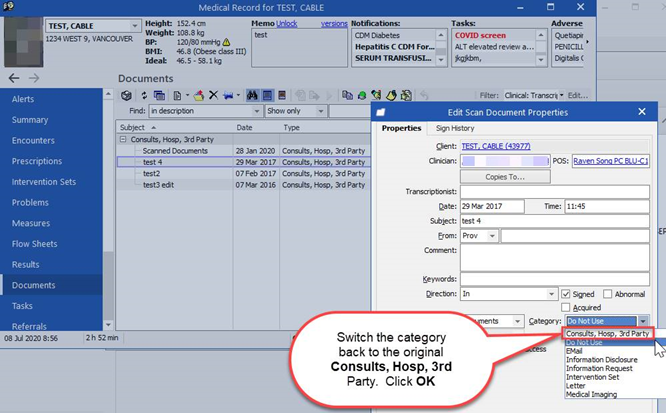
A Profile EMR Scan Processor error has been identified. If you right click on a scanned document and then select Edit Properties, the Category field may automatically re-categorize to the next category in the drop-down menu. For example, if the scanned document was originally categorized as a Consult, Hosp, 3rd Party, it will re-categorize to Do Not Use. Likewise, if a scanned document was originally categorized as Do Not Use, it will re-categorize to EMail and so on.
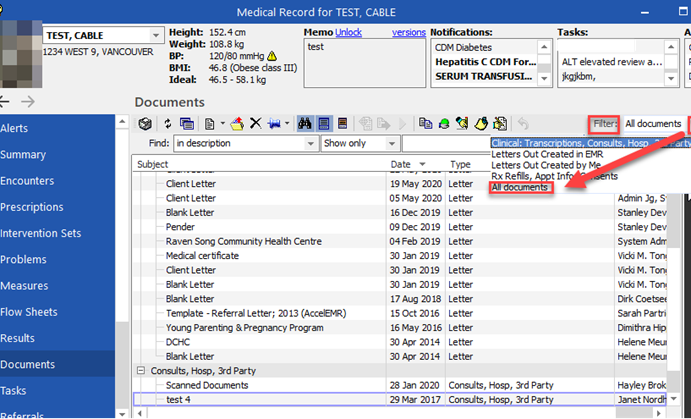
As a result, you may not find documents under the expected filter e.g. Clinical: Transcriptions, Consults, Hosp, 3rd Party, etc. This issue has been reported to the Profile EMR vendor, IntraHealth, and will be fixed in the next upgrade.
Actions Required:
- If you use the Edit Properties functionality, verify the document has not automatically re-categorized. If so, switch it back. See Figure 1.
- If you do not see a document you expected under a specific category, change the Filter to All Documents. If the category is incorrect, contact admin to change it. See Figure 2.
If you have any concerns about this issue, or have concerns that a client’s care has been affected, please contact your on-site Clinical Lead.